Website Payment Acceptance
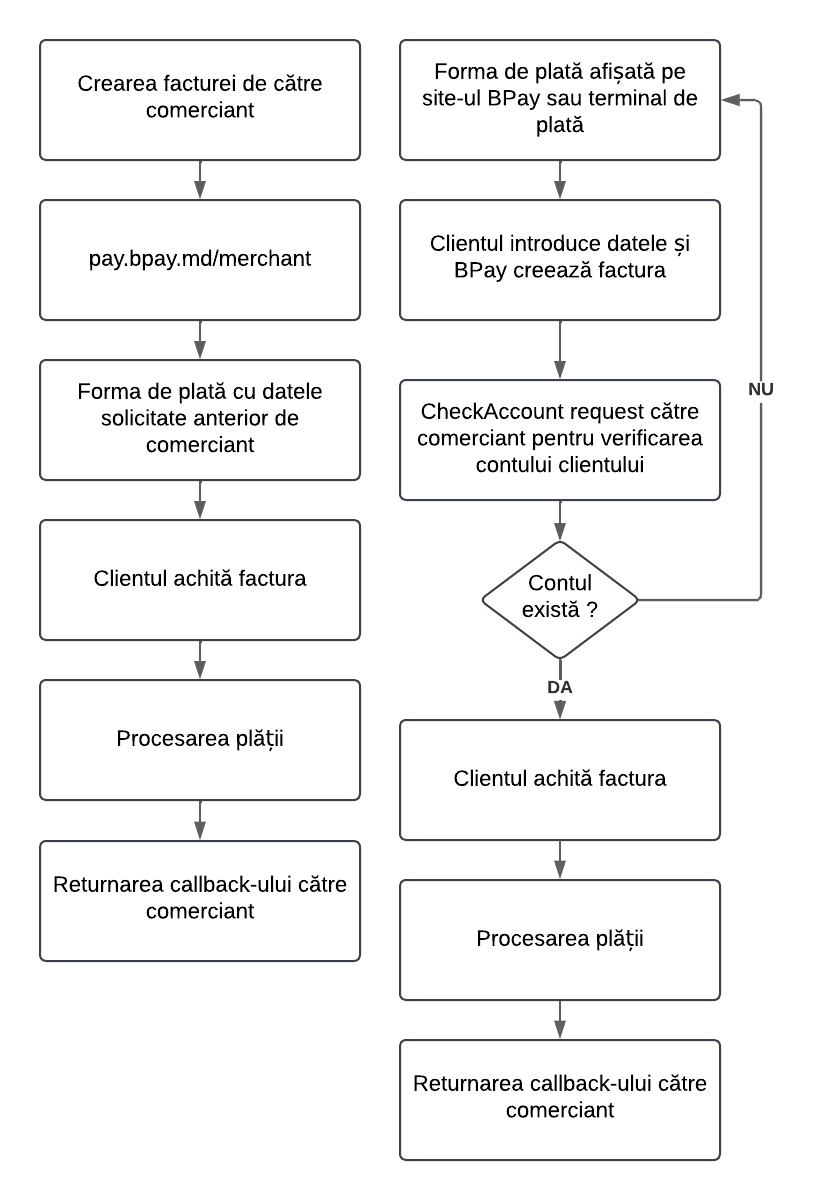
We offer two types of billing: invoices created by the merchant and invoices created by the BPay system.
In the first case, the invoice is created by the merchant using the API described below and the pay.bpay.md platform. In the second case, the invoice is created by BPay on the website or the payment terminal.
The interaction mechanism described below will provide you with the ability to issue an invoice to the user for payment with the amount you specify. The user will either be redirected to the payment service page, where they can pay the invoice in a convenient way, or you will receive a link (URL) of this invoice that you can send to the user via e-mail or generate a QR code.
To initiate a payment through a one-time payment form, you just need to send the user to a special URL and indicate a set of mandatory parameters.
Check Account
Billing
Payment verification (callback)
After the user has paid the invoice issued by you, the BPay.md electronic payment system can automatically notify the online store’s information system about the payment received. To activate automatic notification, you must specify CALLBACK_URL – the script address that will be called. Data will be received via the POST method.
Payment verification (request)
BPay.md system can notify the online store automatically. For this, specify CALLBACK_URL. Data will be received via POST.